Getting free bonus items in Another Eden Begins starts with one menu screen, and the in-game serial code page is the fastest way to turn a published string into a usable reward. Many new players walk past the option because it sits inside the title-screen menu rather than the main in-game menu, so the gift sits unredeemed while the deadline quietly expires. This walkthrough breaks down where the serial code exchange lives, what to expect from each input, and how to claim the Early Bird Ticket plus other launch-era freebies before they cycle out.
Where the Code Menu Actually Lives in Another Eden Begins
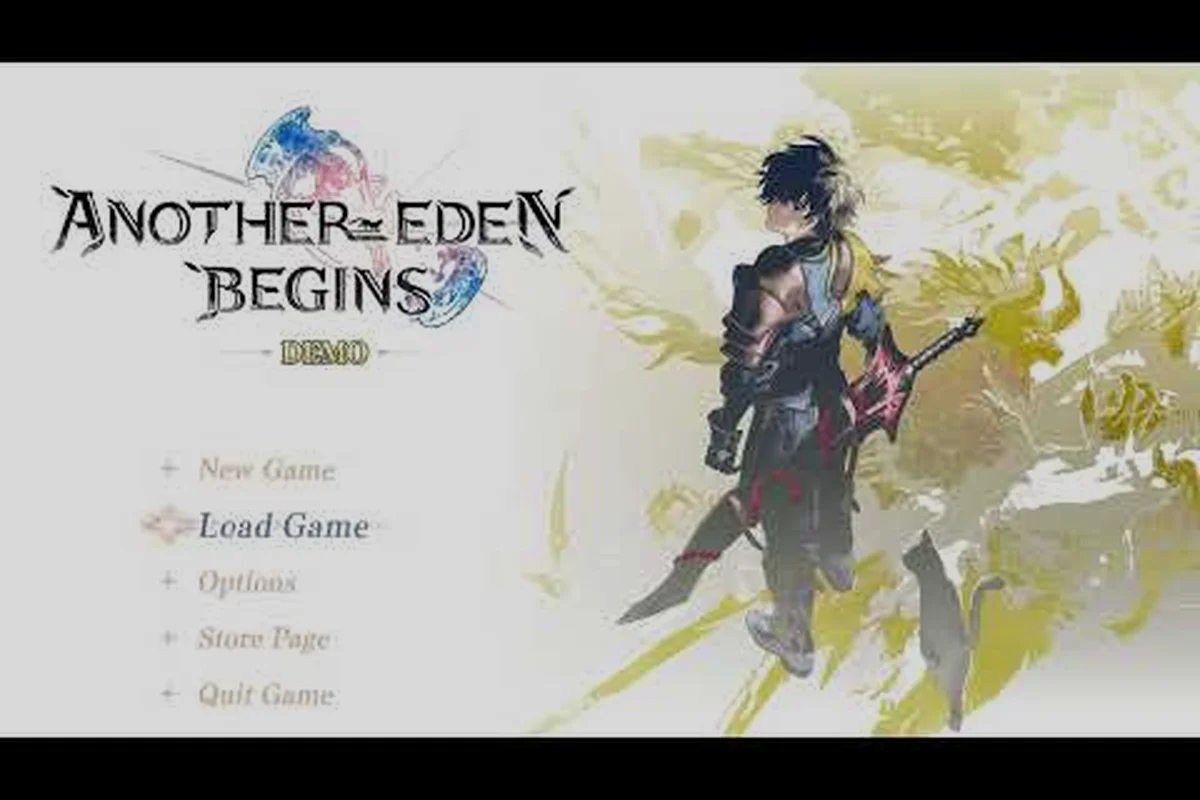
The serial code page is buried one layer deep on the title screen, which surprises a lot of first-time players who assume every redeem option lives inside the main pause menu. According to the Another Eden Begins official website, the remake ships with a built-in redemption hub that pulls reward strings from both the publisher and the platform store you launched from, so the screen looks identical on Switch and Steam even though the codes themselves differ by storefront.
The Title-Screen Path on Switch and Steam
Boot the game, sit on the title screen, and look at the lower-right corner for the small Serial Code button. Tapping or clicking it opens the same entry field on every platform because the title screen acts as a unified launcher for both retail SKUs.
| Platform | Title-screen button | Account required | Where the reward lands |
|---|---|---|---|
| Nintendo Switch | Serial Code (lower-right corner) | Local save profile | Shared in-game mailbox |
| Steam (PC) | Serial Code (lower-right corner) | Linked Steam account | Shared in-game mailbox |
| Demo transfer | Same entry field | Demo save must already be imported | Applied after transfer completes |
That single entry field is the serial code exchange hub for the whole remake. If the title screen reloads after a cutscene or update, the button stays in the same position, which is helpful when you need to enter a long string on a fresh profile.
Why the Menu Sits Outside the Pause HUD
Because Another Eden Begins is a premium remake rather than a free-to-play mobile port, the redemption flow was rebuilt for console players who never tap a pause menu between story chapters. Putting the entry field on the title screen mirrors the pattern used by the publisher's previous physical-edition SKUs, and it lets demo-save transfers use the same entry box without a separate settings submenu.
Community note: players who transferred a Switch demo save reported that the demo bonus was applied through this same title-screen field rather than a separate demo menu, which is why the in-game mailbox often shows a small bundle even before any code is entered.
The structural decision matters because it dictates how the rest of the redemption flow works: every code, every Early Bird Ticket, and every store-specific bonus funnels through one text box and one confirmation pop-up, then drops the reward into the same shared in-game mailbox.
Step-by-Step: Redeeming Codes in Another Eden Begins
Walking through the redemption flow takes about 30 seconds once you know which button to press, but several small details can stall the confirmation if the account state isn't right. The steps below assume a freshly installed copy on either Switch or Steam, which is the most common case for the launch bonus codes that drove most of the early redemption traffic.
Prep: Before You Open the Serial Code Page
Confirm a few basics first so the confirmation does not bounce back with an error toast. Most "code not working" complaints traced back to skipped prep work rather than a broken string, so spending a minute here saves the frustration of an error loop.
| Step | Action | Why it matters |
|---|---|---|
| 1 | Reach the title screen (skip any intro movie) | The Serial Code button only renders on the live title screen |
| 2 | Make sure you are online (Switch Wi-Fi or Steam online) | Code validation requires a live server check |
| 3 | Have the code copied to the clipboard or controller notepad | Long strings are easy to mistype by hand |
| 4 | Open the in-game mailbox once to clear pending items | Prevents a full-mailbox overflow when a new bundle lands |
This "silent fail" is one of the most common redemptions pitfalls in Another Eden Begins, and the cause is specifically the in-game mailbox cap rather than a bad code string. The game stores received bundles in the player mailbox, and once that mailbox reaches its storage limit, any new serial code reward is auto-archived the instant the server delivers it — the player never sees the bundle icon or the +1 counter, so the code looks broken. Concretely, clearing the mailbox at the title screen before pasting the string from the clipboard (per the prep table above) guarantees the freebies / bonus items from the serial code exchange land in a visible slot, so the early bird ticket and any companion drops show up where they can actually be claimed instead of being swallowed into the overflow buffer.
The Actual Entry Flow
With the prep done, the redemption itself is a three-tap sequence. The order of inputs is fixed by the title-screen UI, so a slip here usually means you tapped Cancel instead of Confirm rather than typed the wrong code.
-
On the title screen, press Serial Code in the lower-right corner.
-
Type or paste the 12-to-16 character string into the entry field, watching the case-sensitive letters.
-
Press Confirm and wait for the green success toast, then close the window and check the in-game mailbox for the reward.
The success toast names the bundle that was applied, which makes it easy to match against the published freebies list. If a "code already used" message appears, the same string has already been redeemed on the linked account, and the recovery path is to claim the bundle from the in-game mailbox rather than to re-enter the code.
Common Error Toasts and Quick Fixes
A handful of error messages show up often enough that they are worth a quick reference table. Each one usually points to a different state on the account side, so matching the toast to the fix is faster than a blind retry loop.
| Error toast | Most common cause | Fastest fix |
|---|---|---|
| Code Already Used | The string was redeemed on the linked account earlier | Check the in-game mailbox; the bundle is usually there |
| Invalid Code | Typo or expired window | Re-copy the code from the official post and re-enter |
| Server Unavailable | Maintenance window or region routing | Wait 15 minutes and retry; the entry field does not cache |
| Demo Save Not Detected | Trying to apply a demo bonus before importing the save | Finish the demo transfer, then re-enter the same string |
| Mailbox Full | Too many unclaimed items | Open the mailbox and claim or delete the older bundles |
Reading each toast as a distinct account state — used, expired, blocked, demo-locked, or full — lets you jump straight from the red banner to the right row in the table, so a launch-week early bird ticket that expires in 72 hours can land in your mailbox in under a minute instead of burning an entire afternoon on blind retries.
Types of Codes Available in Another Eden Begins
The remake hands out at least five distinct reward categories, and the serial code page accepts strings from all of them. Knowing which bundle you are actually entering saves a step when the confirmation toast pops up, because the wording hints at which bucket the reward belongs to.
Launch-Era Reward Categories
Most active codes right now fall into the buckets listed below. Community tracking threads on the r/AnotherEdenGlobal subreddit keep a running tally, but the category breakdown itself is stable across platforms because the publisher posts the same string families on every storefront.
| Category | Typical reward | Where it is published | Typical deadline |
|---|---|---|---|
| Early Bird Ticket | Premium gacha currency, single-pull ticket | Official launch announcement | Roughly 30 days post-launch |
| Pre-order bonus | Costume set, small stat shard | Platform store page (Switch eShop / Steam) | Window tied to the order date |
| Demo bonus | Starter gear pack, exp boost | Demo download confirmation | Until demo save is transferred |
| Retail / collector edition | Art book code, exclusive weapon skin | Inside the physical box | Static, no expiry listed |
| Anniversary gift | Free multi-pull, limited currency | In-game news banner | Annual, exact date varies |
The Early Bird Ticket is the highest-priority serial code exchange target for new players because its roughly 30-day post-launch window closes before the pre-order bonus or anniversary gift strings are even activated on the serial code page, and missing it forfeits the premium gacha currency bundle (single-pull ticket included) that early adopters use to seed their first multi-pull roster in Another Eden Begins. Community-maintained trackers on r/AnotherEdenGlobal pin these codes at the top of the listing precisely because the publisher rarely reissues the launch-window string once the deadline lapses, so anyone who bought the game in the first month should treat the Early Bird Ticket redemption as a same-day task rather than a backlog item.
What the Confirmation Toast Tells You
After a successful entry, the green toast names the bundle and credits the reward to the in-game mailbox. The toast rarely lists the exact item count, so most players hop to the mailbox to confirm the contents before moving on, especially for bundles that include both currency and a cosmetic piece. For deeper context on the Early Bird Ticket rewards and how it stacks with the pre-order bonus, the Another Eden Begins serial codes hub keeps a current snapshot of which strings are still active.
Troubleshooting: Codes Not Working or Missing Rewards
Most "broken code" reports actually fall into one of three buckets: account state, mailbox overflow, or a mistyped string. Walking through these in order catches the failure fast without burning a customer-support ticket, which is important because the publisher's support queue during launch week can stretch past 48 hours.
Account and Save State Checks
The serial code page is account-aware, which means the same string behaves differently depending on whether the linked profile has already used it, transferred a demo, or is logged in to a region-mismatched storefront. Community reports from the Steam community thread on app 4163960 note that region-locked codes are the most common silent-failure case, especially for players who moved their Steam account to a different country before redeeming.
| State | Symptom | Resolution |
|---|---|---|
| Region mismatch | Invalid Code on a string the official site confirms is active | Switch the storefront region back temporarily and re-enter |
| Demo transfer pending | Demo Save Not Detected on demo-only codes | Finish the transfer, then re-enter the same string |
| Linked account already used | Code Already Used even on a fresh install | Check the mailbox; the bundle should already be sitting there |
| Save profile not selected | Confirmation succeeds but the reward does not appear | Switch to the profile that owns the save, then open the mailbox |
| Pre-launch patch missing | The Serial Code button is greyed out | Update the game to the latest patch and reboot |
A surprising number of "missing" rewards turn out to be sitting in a different profile's mailbox, which is common on Switch where multiple local accounts share one console — each user tied to their own Another Eden Begins save file, and the serial code page only delivers to the profile currently selected in the title screen. Before assuming a code failed, switch to every local account on the Switch one at a time, open the in-game mailbox on each, and confirm whether the bundle (such as the early bird ticket bonus or a free codes reward) has already landed elsewhere; redeeming on the wrong profile is the single most common reason a successful confirmation produces zero visible items.
Evidence and Escalation Steps
If the error toast still appears after re-entering the same string twice, the next step is to capture the on-screen error code and a screenshot of the title-screen entry field, then open a ticket with the publisher. The reference number from the failure toast is the most useful piece of evidence because the support team can look it up server-side, whereas a screenshot of the typed string alone does not tell them anything they cannot see on their end. For codes that expire before the ticket is answered, the safest fallback is to claim the equivalent reward from the in-game mailbox if a parallel bonus is available, or to wait for the next anniversary gift window. The Another Eden Begins code error and expiry reference has a longer write-up of the most common failure paths and how the support queue has responded in past launches.
Maximizing Your Free Rewards: Freebies and Bonus Strategy
Claiming a code is only step one, because the serial code exchange hands out the bundle but does not tell the player how to use it. A short follow-up loop on the mailbox, the party screen, and the gacha screen is what turns a string of digits into a meaningful head start, and the order of those clicks matters when the Early Bird Ticket is in play.
Claim, Equip, Pull, Repeat
The four-step loop below is what experienced launch-week players ran through after every successful code entry. It looks long written down, but each click takes a few seconds, and the whole sequence fits inside a minute on Switch and Steam alike.
-
Open the in-game mailbox and tap Receive All to pull every bundle into the inventory.
-
Visit the party screen and equip any weapon skins or stat shards that came with the bundle.
-
Spend the Early Bird Ticket on the gacha screen before any paid currency, because the ticket is a guaranteed one-pull that does not scale with later banners.
-
Re-check the news banner for a fresh code, then loop back to the title-screen entry field.
That order matters because the Early Bird Ticket is single-use per account, and burning it on the wrong banner window is a regret that lasts the whole patch cycle, since new event banners typically rotate every 4–6 weeks and a misplaced pull cannot be refunded, re-rolled, or carried into the next serial code wave. Holding the ticket for a featured-rate-up banner (e.g., a new Mythos-class or 5★ alt) yields a far higher expected value than spending it on a permanent pool where the same character may enter a Dreaming World rate-up later; this is exactly why veterans bank the pull until a Dreaming Demon or AS-style rerun drops, and only cash it in once a fresh free codes batch is also already claimed.
Stacking Launch Bonuses Without Wasting Pulls
Players who pre-ordered, transferred a demo, and entered the Early Bird Ticket ended up with three separate reward pools, but the smart move is to bank the paid currency and only spend the ticket. The pre-order costume does not affect combat stats, and the demo gear is strong enough to clear the first two story chapters without an upgrade, so a coordinated pull on a future banner is almost always a better value than a scatter-shot spend on the launch roster. A wider Another Eden Begins beginner playbook walks through party building after these launch rewards land, which is the natural next step once the freebies are banked.
A Quick Freebies Priority Checklist
For players who only have a few minutes, the Early Bird Ticket and pre-order costume from the serial code exchange vanish the fastest because both are tied to storefront timers, not in-game timers — Apple's refund window is 90 days, Google Play's is 48 hours after download, and Steam bonuses expire 60 days from purchase, so claiming them through the serial code page on day one guarantees you beat the storefront clawback deadline.
| Priority | Action | Why it is time-sensitive |
|---|---|---|
| 1 | Enter the Early Bird Ticket string | Window closes roughly 30 days after launch |
| 2 | Claim the pre-order costume and shard | Some storefronts revoke unclaimed bonuses after 60 days |
| 3 | Spend the Early Bird Ticket on a gacha banner | The ticket is single-use; the wrong banner is permanent |
| 4 | Re-check the news banner weekly | Anniversary and patch gifts rotate on a quiet schedule |
| 5 | Back up your save profile | The serial code page does not auto-restore state on a new device |
Step five is the one most launch-week guides skip, but losing a save profile is the only redemption path that cannot be recovered through a fresh code entry: even after you re-enter every valid Another Eden Begins string on the serial code page, your cleared story progress, gacha pulls from the Early Bird Ticket, and unlocked episode flags stay gone because codes only grant items, never restore account state. The reliable fix is exporting your player ID from Settings → Account before any device migration, then verifying the cloud-save timestamp under "Linkage" matches your last session, since a mismatched timestamp means even valid codes land on an empty serial code exchange queue.
Frequently Asked Questions
Where exactly is the serial code page in Another Eden Begins?
The page is the Serial Code button in the lower-right corner of the title screen. It is not inside the in-game pause menu, so you must return to the title screen before entering any string from the official site.
Do Switch and Steam codes work on both platforms?
No. Codes are storefront-locked, so a Switch string will throw an Invalid Code error on Steam and vice versa. Always grab the code from the storefront where you bought the game, and check the r/AnotherEdenGlobal subreddit for the most up-to-date list when in doubt.
Can I redeem the Early Bird Ticket more than once?
No. The ticket is a single-use reward per linked account, which is why the community recommends spending it on a future banner rather than the launch roster. If the ticket is already gone, the next-best free currency comes from the anniversary gift window.
What happens to my rewards if my mailbox is full?
The bundle still lands in the mailbox, but the overflow is silently archived. Open the mailbox, claim or delete the older items, then re-enter the code if the success toast did not appear the first time. A related reference on Another Eden Begins serial code login quirks covers the edge case where the mailbox cap triggers a server-side drop.
Do I need an internet connection to redeem codes?
Yes, the entry field runs a live server check on every confirmation. Offline mode throws a Server Unavailable toast, and the code does not save to a local queue, so you must reconnect and re-enter the same string to apply the reward.